Sharpening (High-Pass) Filters
Sharpening emphasizes transitions in intensity to make an image appear crisper and more detailed.
High-Pass Filters are a frequency or spatial technique that enhance sharp edges and fine details while removing or reducing broader, uniform areas.
It does this by ➀ amplifying the high-frequency components of an image — the parts where pixel intensity changes rapidly and ➁ suppressing low-frequency data (smooth gradients, large objects).
graph TD
    A[Sharpening / High-Pass Filters] --> B[Second Derivative Based]
    A --> C[Composite / Enhancement Techniques]

    B --> B1[Laplacian Filter]
    B --> B2[Laplacian of Gaussian - LoG]

    C --> C1[Unsharp Masking - USM]
    C --> C2[High-Boost Filter]

    style A fill:#4A90D9,color:#fff
    style B fill:#E8A04C,color:#fff
    style C fill:#C586C0,color:#fff
Pure High Pass filter Formula
When
When
1. UnSharp Masking (USM)
Spatial
The unsharp filter is a most simple sharpening technique which enhances edges (and other high intensity components in an image).
Application: It is primarily used for edge detection and image sharpening
How it works?
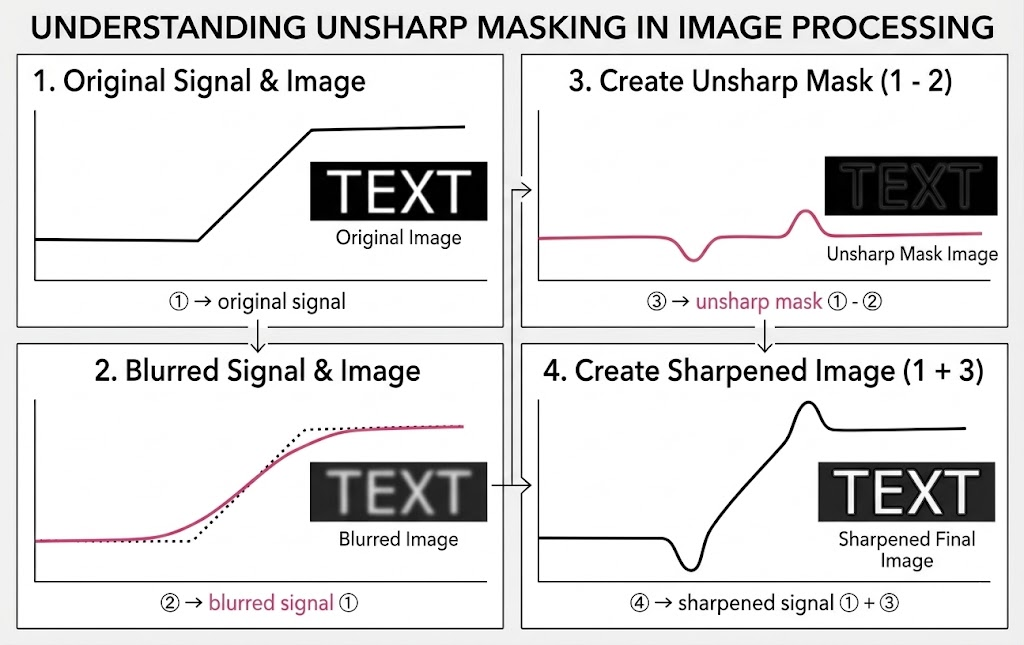
It works by subtracting a blurred (or "unsharp") or smoothed version of the image from the original, isolating the fine details, and scaling them to make edges
The process consists of three main steps:
- Blurring: A blurred (or smoothed) version of the original image is created, typically using a low-pass Gaussian filter.
- Detail Extraction: The blurred image is subtracted from the original image. This isolates the high-frequency details (edges and fine textures).
- Scaling & Addition: This extracted detail is multiplied by a scaling factor and added back to the original image
where
Visual Representation
Mathematical Example
When to use?
- Enhancing soft or slightly blurry photographs.
- Post-processing in photography, printing, and display pipelines.
- Improving perceived sharpness of medical or satellite images.
When to avoid?
- On already noisy images — sharpening amplifies noise alongside edges.
- When the image is severely out of focus — sharpening cannot recover information that was never captured.
Always apply noise reduction before sharpening, not after. Sharpening first will amplify noise, and subsequent smoothing will then undo the sharpening — a destructive cycle.
2. High-Boost Filter
Spatial
Similar to UnSharp Masking (USM), High-boost filtering too is an image sharpening technique used to enhance edges and fine details while retaining the original image's smooth background. It acts like a high-pass filter (which highlights edges) but preserves the image's low-frequency components (overall shading and brightness).
How it works?
It is a generalized approach it combines the original image and its high-frequency details into a single, adjustable equation.
when
- When A = 1 (High-Pass Filter): The
term becomes zero. The equation simplifies to just . As we established earlier, this is a pure High-Pass filter, which only leaves the isolated edge details and removes the original image entirely. - When A = 2 (Standard Unsharp Masking):
becomes . The equation becomes . This matches our previous Unsharp Masking formula where the edge details are added back to the original image exactly once (a scaling factor of ). - When A > 1 (High-Boost Filtering): This is where the "boost" comes in. If
is greater than (e.g. or , but ), original image is amplifies overall brightness of the original image by scale factor of "A" while simultaneously adding the sharpened edge details back in.
When to use
- When Unsharp Masking is not strong enough and you need more aggressive sharpening.
- It is perfect for emphasizing textures, whiskers, or fine text without completely washing out the dark, smooth background regions of the image
- Enhancing degraded or compressed images (e.g., JPEG artifacts).
When to avoid
- Noisy images — same caution as Unsharp Masking, amplified further.
- When
is set too high, the output can look unnatural with halo artifacts around edges.
- If A is too large: The image can become unnatural, over-sharpened, or noisy.
3. Laplacian Filter (for Sharpening)
The Laplacian filter is a one of the main and used and fundamental tool in image processing, belonging to the high-pass filter family. While the filters like the basic Unsharp Mask, which often rely on first-order derivatives (calculating the difference between adjacent pixels), the Laplacian is a second-order derivative filter.
Instead of just asking "Is there a change in brightness here?" it asks "How fast is that rate of change changing?". Basically second-order derivative operator used to measure the rate of change in pixel intensities.
It is highly effective for identifying areas of rapid intensity transitions, making it a fundamental tool for 👉 edge detection, 👉 image blending, and 👉 blur assessment but 👎 it also makes it extremely sensitive to random image noise.
How It Works?
1. In continuous mathematics, the Laplacian of an image with pixel intensity values
where
and measures the acceleration of pixel brightness changes horizontally and vertically respectively. - Adding them together gives an overall, multi-directional (isotropic) measurement of edge sharpness.
2. Spatial Domain (Convolution): Since digital images are made of a discrete grid of pixels, we have to find a discrete convolution kernel (a small matrix) that can approximate the second derivatives in the definition of the Laplacian. Two commonly used small kernels are shown below.
3. Frequency Domain (Fourier Transform)
When performing image processing or signal analysis, you apply the Laplacian in the frequency domain using the following steps:
- Transform: Convert the original spatial image
into the frequency domain using a 2D Fourier transform. - Filter: Multiply the frequency-domain image by the Laplacian transfer function
. - Inverse: Convert the filtered result back to the spatial domain using an inverse Fourier transform.
Usecase
- Edge Detection: Because the second derivative crosses zero at the exact location of an edge, it is often used in a "zero-crossing" edge detector to find precise object boundaries
- Image Sharpening: The Laplacian image can be subtracted from or added to the original image to enhance fine details and make blurred edges appear crisp.
The Problem of Noise
Because second-order derivatives amplify noise severely, the Laplacian filter is almost always paired with a Gaussian smoothing filter. This combination is known as the Laplacian of Gaussian (LoG). It smooths out high-frequency noise first, and then applies the Laplacian to cleanly extract the broader edges.
4. Laplacian of Gaussian (LoG)
How it works
First applies a Gaussian blur to suppress noise, then applies the Laplacian (second-order derivative) to detect regions of rapid intensity change. Zero-crossings of the Laplacian output mark edge locations.
A common 5×5 LoG kernel approximation:
When to use
- Detecting blobs, circular features, and fine lines.
- When you want edges that are localized at zero-crossings (subpixel precision is possible).
- As part of scale-space analysis (compute LoG at multiple scales to find features at different sizes).
When to avoid
- When the image has many competing edges at different scales — LoG can produce false or merged edges.
- As a standalone edge detector in noisy environments without tuning
.
LoG produces both positive and negative responses around an edge. Naively thresholding the output (e.g., looking for values > 0) will not give clean edges. You must detect zero-crossings in the output, not simply threshold the magnitude.
Questions and Answers
1. The Key Distinction between High Pass Filter and UnSharp Masking
The difference between a High Pass filter and Unsharp Masking lies entirely in what you do with the detail once you find it.
-
High Pass Filter (Isolation): A High Pass filter’s will only strip away all the flat, low-frequency information (the blurred image) to isolate the high-frequency edges and details.
If you look at the raw output of a High Pass filter, it doesn't look like a normal photo; it usually looks like a flat gray canvas with the edges highlighted in lighter and darker tones. -
Unsharp Masking (Enhancement): Unsharp Masking uses a High Pass filter. It takes that isolated detail, multiplies it by your strength factor (
), and adds it back onto the original image.
If we define the High Pass filter as
- The High Pass Filter:
- Unsharp Masking:
What us Amplification vs. Diminishment of Central Pixel?
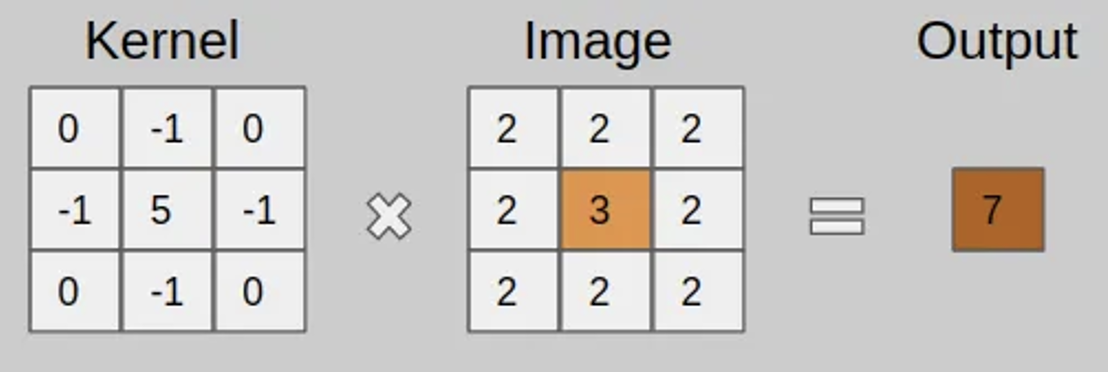
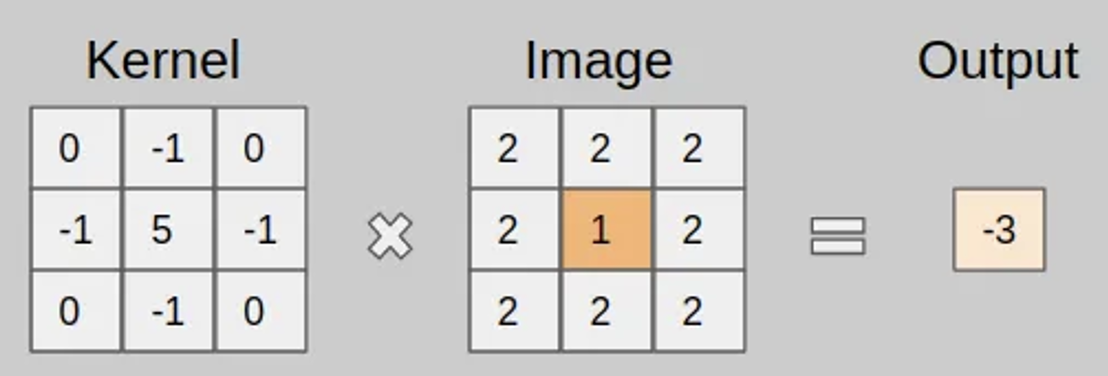
A sharpening kernel enhances contrast by emphasizing edges and fine details in an image. It works by applying a weighted transformation to the central pixel, highlighting differences with surrounding pixels.
| Central Pixel Amplified | Central Pixel Diminished |
|---|---|
| A higher central pixel value gets amplified, making edges sharper | A lower central pixel value gets suppressed, reducing visibility. |
| - The central pixel (3) has a higher value than its neighbors (2s). - The kernel applies a stronger positive weight (-5) to the central pixel. - The output pixel intensifies the contrast, making the center more prominent. |
- The central pixel (1) has a lower value than its neighbors (2s). - The same sharpening kernel now reduces its impact due to the strong negative weight (-5). - The output pixel diminishes the contrast, making the center less noticeable. |
 |
 |