LOESS Plot (Locally Weighted Scatterplot Smoothing)
Purpose
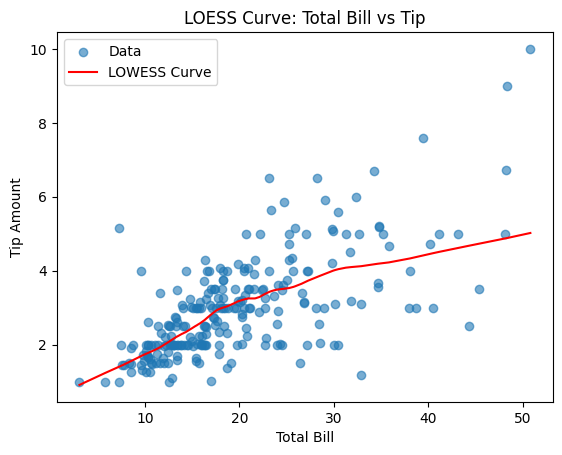
Fit a smooth non-parametric curve to data to reveal underlying trends and patterns without assuming a specific functional form.
Analysis Type
Bivariate
What to Look For
1. Linearity
- Linear: LOESS will produce a straight line in the plot.
- Non-Linear: Curved or oscillating LOESS lines indicate non-linear relationships.
- Shows true trend without forcing linearity
2. Trend Direction
- Increasing: Positive relationship
- Decreasing: Negative relationship
- Flat: No relationship
- Changing: Relationship varies across range
3. Local Behavior
- How relationship changes in different regions
- Identifies thresholds or breakpoints
- Shows where relationship strengthens or weakens
4. Linearity Assessment
- Linear: (can use linear regression)
- The LOESS line is almost straight (or close enough that a straight line would match it well).
- Non-Linear: (need polynomial features or transformations)
- LOESS clearly bends: changes slope, flattens out, turns around, or forms S/U-shapes.
- The curve shows regions with different behavior (e.g., flat then steep) = classic non-linearity.
- Even a slight "bow" in the LOESS line is a signal that the relationship isn't perfectly linear.
5. Outlier Impact
- LOWESS is robust to outliers
- Points far from curve are outliers
- Curve shows trend ignoring outliers
Code Example
import statsmodels.api as sm

# Scatter plot with LOWESS curve
x = df['x_variable']
y = df['y_variable']

# Calculate LOWESS
lowess_result = sm.nonparametric.lowess(y, x, frac=0.3)

# Plot
plt.scatter(x, y, alpha=0.5, label='Data')
plt.plot(lowess_result[:, 0], lowess_result[:, 1], color='red', linewidth=2, label='LOWESS')
plt.title("LOWESS Smoothing")
plt.xlabel("X Variable")
plt.ylabel("Y Variable")
plt.legend()
plt.show()

# Seaborn version (easier)
sns.regplot(x='x_variable', y='y_variable', data=df,
            lowess=True, scatter_kws={'alpha':0.5},
            line_kws={'color':'red', 'linewidth':2})
plt.title("Scatter Plot with LOWESS Curve")
plt.show()
Pro Tip
The frac parameter (default 0.3) controls smoothness: lower values (0.1-0.2) create more wiggled curves that follow data closely, higher values (0.4-0.6) create smoother curves. Use frac=0.2 for large datasets and frac=0.4 for small datasets. Compare LOWESS curve to a straight line - if they're similar, use linear regression; if different, you need non-linear modeling. Create both: sns.regplot(x, y, lowess=True) and sns.regplot(x, y, lowess=False) side-by-side to assess linearity.
Documentation